Creating a marketing attribution data source: the challenges and solutions
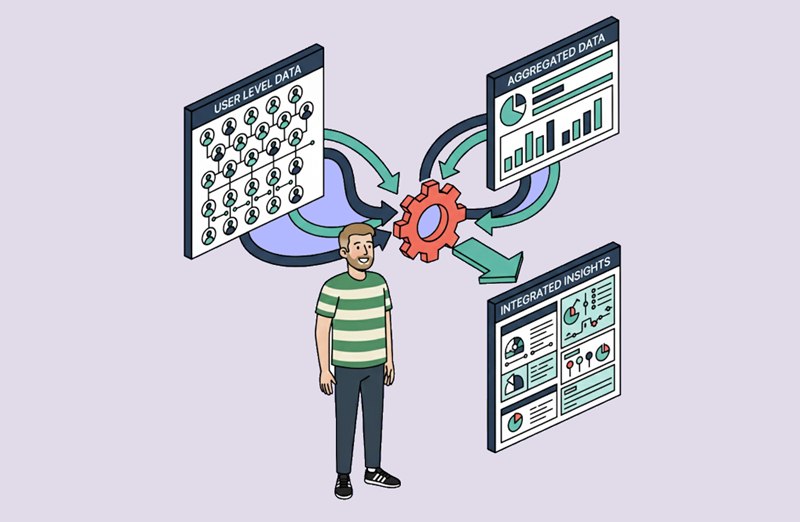
In the previous post, I went over some of the theory in combining user-level and aggregated information into a marketing attribution data source. In this post, I’ll talk about some of the practical challenges I faced when setting up this data source at my present company, Zenjob SE.
I’ve spent the last few months grappling on-and-off with utm_campaigns, anonymous user IDs, referrers and postback windows, and trying to tie them together in a single marketing attribution data source. Having just pushed version 2 of this data source, I thought now would be a good time to document and go over some of the trickiest challenges which have presented themselves during the process.
But before we go any further, let me clarify what I mean by ‘marketing attribution data source’.
_What is a marketing attribution data source?__
Some background: Zenjob is a mobile app first company. In the context of attribution, our Digital Marketing team are mainly interested in measuring the effectiveness of paid and organic campaigns in driving app installs and post-install events. We also have a website with the option to sign up for our service; all further functionality is in the mobile app only.
We use a Mobile Measurement Platform (Adjust) to attribute mobile app installs from the typical ad publishers like Google and Tiktok. Adjust also records iOS installs and post-install events from SKAdnetwork. Web signups are tracked using standard UTM parameters, which are saved to our core database as well as our CDP, Segment.
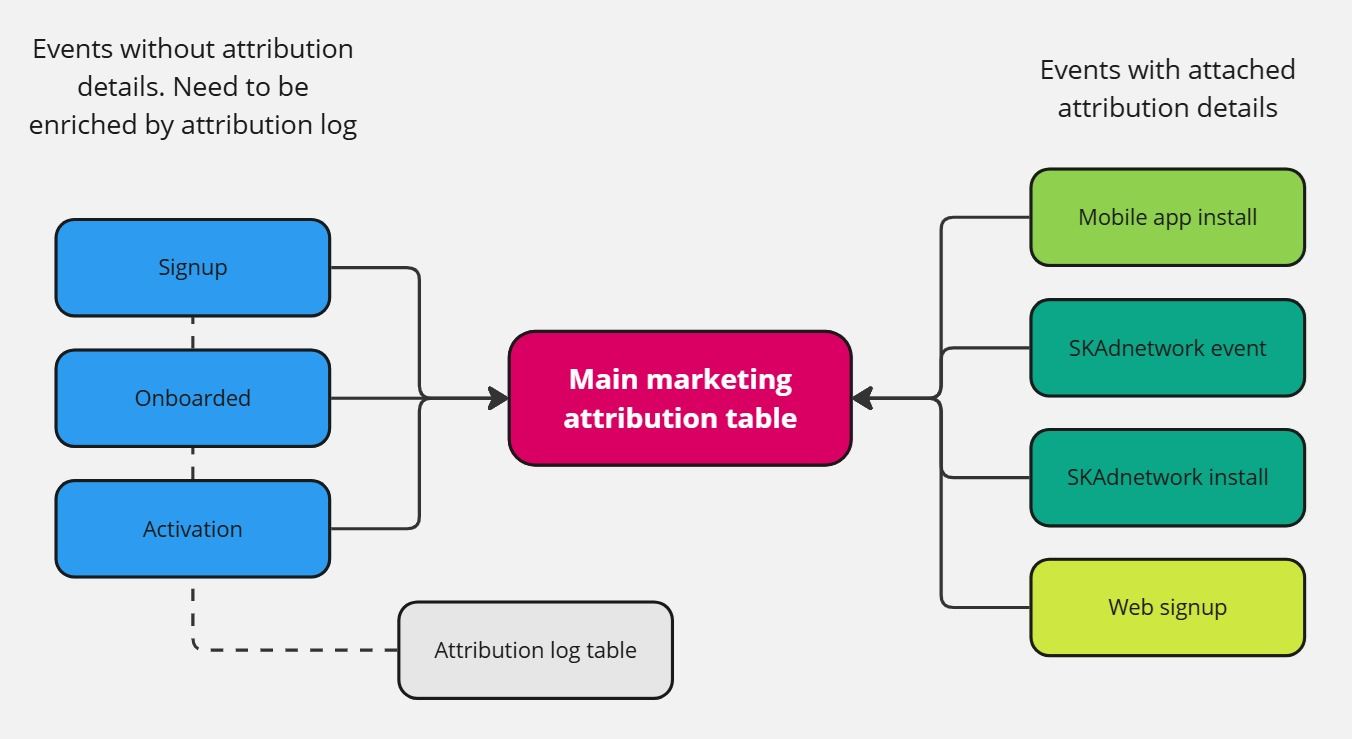
All these attribution details are collected, along with acquisition funnel events from our core infrastructure, and stored in various tables in the data warehouse. Zenjob’s acquisition funnel consists of 4 key events:
1. Mobile app install

2. Signup

3. Onboarded (user has provided documents, signed contract)

4. Activation (user has worked the first shift)
The objective of this project was to assemble all of these sources of data into a single marketing attribution data source, and allow our marketing analytics team to improve the accuracy of our reporting and dashboards.
_Why is this necessary?__
Zenjob’s previous marketing attribution data source was forged more than 4 years ago, in times (metaphorically) immemorial. To be fair, in times practically immemorial too, seeing as everyone involved in that data source have long since departed the company.
Since those simpler, better times, attribution has been battered by the likes of iOS 14.5 in 2021, the continuing effect of GDPR/ePrivacy regulations, as well as newer industry practices like Google’s Consent Mode. We also have new aggregated data sources, like the aforementioned SKAdnetwork or SKAN to consider.
With all of these factors in play, the old data source was well-and-truly obsolete; with outdated channel definitions and incomplete data.
As luck would have it, our enablement-focused Zenjob Data team had spent some time onboarding all of us non-engineer techie types on DBT some months back, so I was all set to create the new marketing attribution data source.
Key features include:
- Integrated aggregated data e.g. from SKAN 4
- Meta install referrer data
- Updated channel and sub-channel definitions
- More efficient reporting: acquisition funnel event data is taken from the core Employee tables. Data from attribution sources is used as an ‘attribution log’, which is then mapped to the event using internal Zenjob identifier and the timestamp
…and what does this mean in clear numbers? We are able to map 87% of acquisition funnel events recorded in our core Employee table to an attribution log event – which isn’t bad, considering we lose a significant proportion of attribution data when users refuse consent to third party data sharing.
But enough of basking in the glory of a job somewhat-well done, if you’re like me, you’re more interested in the difficult parts. Let’s go!
_1. How to map pre-signup to post-signup events__
The first elephant in the room is also the one with the longest trunk i.e. the trickiest one to solve. As mentioned above, Zenjob has 4 key events in the acquisition funnel. The best case scenario is when we can link all those events to a single user ID – and link that to the source & campaign which brought the user to our app.
There is a problem, however.
The first point in the acquisition funnel when we can link a durable user identifier (email address) to an internal user ID is on the signup event. That means at the point of install, our internal ID is not available and we are therefore unable to build an end-to-end funnel journey. Or to put it another way, we need another ID!
On web, this ‘pre-signup <> post-signup’ mapping is commonly accomplished by dropping a cookie on the user’s browser (with proper user consent, of course) containing an anonymous user ID.
On our mobile app, Adjust sets its own identifier (ADID, or Adjust ID) which is linked to the device ID. So, problem solved then? Unfortunately not. Each ADID can be linked to multiple user IDs – when a user signs into a single Zenjob account on separate devices. One user ID can be also linked to multiple ADID, which occurs when many users sign into their accounts on the same device.
The solution: create a user ID <> ADID mapping table, with all instances of unique ID maps and the date when the map happened.
with ranked_mapping as (
select
    adid,
    user_uuid,
    created_at_dt
from
    source
where
    user_uuid notnull
    -- NULL values are saved AS 'nan' in the raw Adjust table
    and user_uuid != 'nan'
    -- Only get records in the last year
    and created_at_dt >= CURRENT_DATE - interval '1' year
    )
select
    adid,
    user_uuid,
    -- min to get the first example of the ADID-UUID association
    min(created_at_dt) as created_at_dt
from
    ranked_mapping
group by 1,2
It’s then simply a matter of getting the ID mapping which happened closest to the install event time.
In this way, I was able to link a high proportion of the install events to a user ID (except when a user who installed didn’t go on to signup, of course).
_2. How to get current attribution details, considering we can have re-attributions__
To which channel should attribution credit be assigned for post-install events? The eternal question that has troubled acquisition and retention marketers since the dawn of … digital marketing. Acquisition marketers want credit for the install channel. Retention marketers want the most recent one.
Our MMP, Adjust, (along i’m sure, with every other MMP) records both ‘install attribution’ and ‘re-attribution’. Install attribution represents the ad network, campaign etc that brought your user to your app for the first time, whereas re-attribution happens every subsequent time that they engage with one of your trackers (a tracking link to your app/website with identifying parameters) – on a CRM email, for example; or a retargeting campaign.
But what does this mean for our attribution data source? Well, retention won the fight: we don’t enforce an inactivity period, meaning users are re-attributed whenever they click on a tracker and credit for the post-install event is given to the last channel.
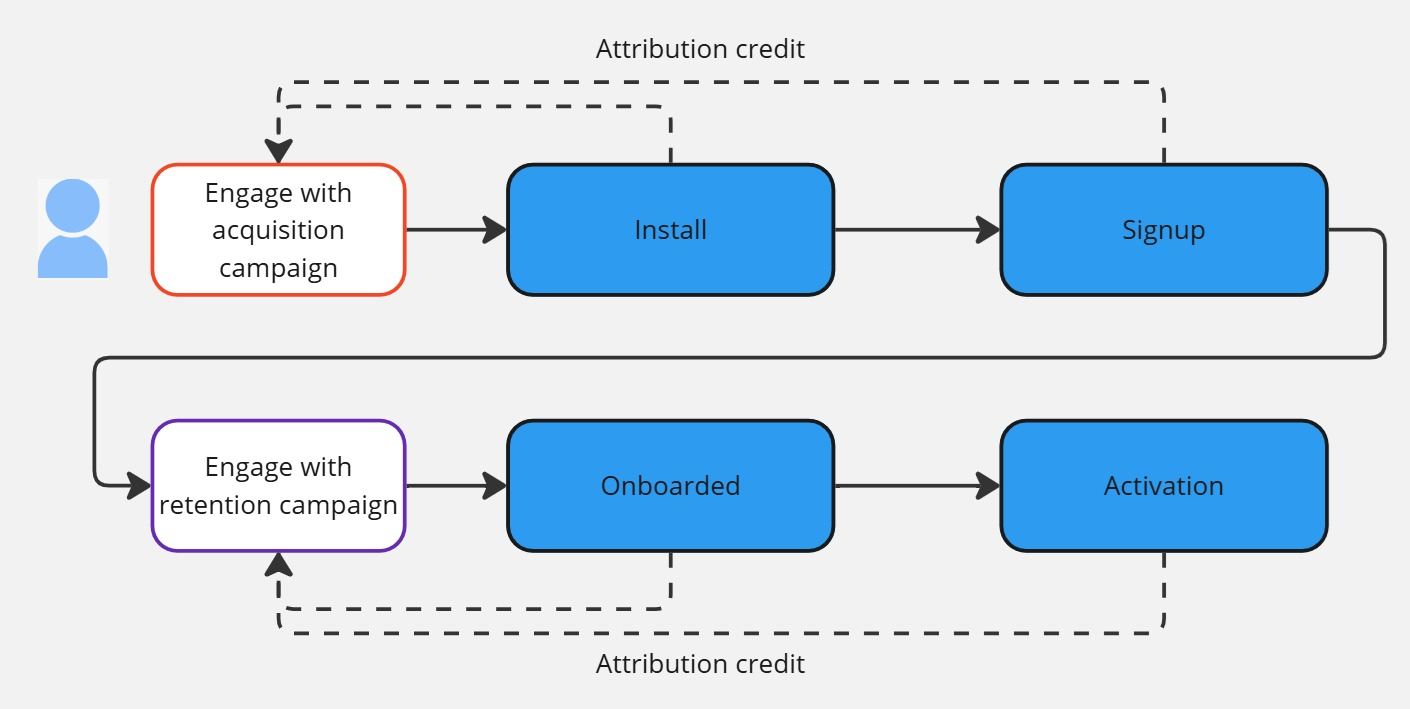
As previously mentioned, the acquisition funnel/post install events with the user ID are taken from our core employee table. We can then simply map those values to the last tracker chronologically which the user engaged with before they did the event – be it an install platform like Google Ads, or a retention one like Braze.
-- Get the log that occurs closest chronologically to the event time
    left join {{ ref('mkt_attribution_v2_log') }} log on map.adid = log.adid qualify ROW_NUMBER() OVER (
        PARTITION by map.user_uuid,
        map.adid,
        map.activity_kind,
        map.created_at
        ORDER BY ABS(
                EXTRACT(
                    EPOCH
                    FROM (map.created_at - log.created_at_dt)
                )
            )
) = 1_3. How to build a functional campaign mapping without a reliable naming convention__
The incorrect use of naming conventions by marketers has led to inter-departmental war in some of my previous companies, with Data Engineers/Analysts driven to despair and anger when forgetful marketers name their campaigns incorrectly. Whilst we have a marketing naming convention in Zenjob, it has changed several times over the years and has been rather inconsistently used – probably on several occasions by yours truly.
When setting up this new data source, one of my main objectives was to conquer mount ‘badly-used-naming-convention’ and plant my flag on its peak. I wanted to provide a channel (e.g. Paid Search, Paid Social) and channel detail (e.g. Performance Max, Facebook) to make building the end-process dashboards and reports easier.
In the ideal world, the information for creating the channel and channel detail would be all contained in the (utm_)campaign parameter. Unfortunately the ideal world is not always the real world: the data for mapping the channel details was spread across many parameters. What to do? Create a channel mapping table where combinations of source, campaign, content and term parameters are mapped to a channel and channel detail. Sounds complicated, right? Actually, I wouldn’t say ‘complicated’, but it was definitely a lot of rows!
…and how to maintain this new channel mapping?
As a data driven and experimental marketing team, we are naturally adding new channels and tests frequently – so we need a solution which enables us to quickly alter the mapping without constantly updating the core code. Our Data team came up with a good solution here. We have the mapping table in a Google Sheet, which is then pulled into the DWH as a source table daily. All that’s left to do is join the attribution parameters from our marketing attribution data source to the channel mapping from the Sheet source table. Problem solved!
FROM mkt_attribution_main mt -- With the first join, we map the *current* attribution details to a channel/channel_detail
    LEFT JOIN google_sheet_channel_mapping channel_map ON CASE
        -- Separate mappings for web and app
        WHEN LOWER(mt.platform) = 'web' THEN CASE
            -- exception for Organic Search
            WHEN mt.source IS NULL
            AND mt.first_referer NOTNULL THEN mt.platform = channel_map.platform
            AND mt.first_referer ILIKE channel_map.first_referer -- exception for Google Paid search
            WHEN LOWER(mt.source) = 'google-search' THEN LOWER(mt.platform) = LOWER(channel_map.platform)
            AND LOWER(mt.source) = LOWER(channel_map.network_name_pattern)
            AND LOWER(mt.campaign) ILIKE ('%' + channel_map.campaign_name_pattern + '%') -- exception for Meta/Tiktok paid and organic campaigns
            WHEN LOWER(mt.source) IN ('meta', 'tiktok') THEN mt.platform = channel_map.platform
            AND mt.source = channel_map.network_name_pattern
            AND mt.medium = channel_map.medium_name_pattern -- Everything else matches on network name. For future channel mappings, we should ensure that network names are distinct, so we can use them.
            ELSE LOWER(mt.platform) = LOWER(channel_map.platform)
            AND LOWER(mt.source) = LOWER(channel_map.network_name_pattern)
END -- Mobile mappings_Summing up__
Our new data source is now powering our Tableau dashboards more accurately than before. As always, the wider attribution landscape is in constant flux – with new privacy measures and new tools affecting the quantity and quality of data, especially on a user level. Whilst it’s easy to track what happens once a user reaches your infrastructure, determining where they came from is likely to get harder and harder – forcing marketing tech and analytics to regularly revisit their tracking setup.
Thanks for reading!